Tencent’s QQ Mail team has started testing Agent Mail, a dedicated email service designed for AI agents rather than human users.
The basic idea is simple: assign an agent an address such as [email protected], then let it receive and read messages, compose and send email, handle attachments, and work with scheduled tasks. In effect, the agent gets its own communication channel and can participate in real workflows instead of remaining confined to a chat window.
Agent Mail is separate from a user’s personal mailbox and is designed specifically for agent-based operation. The service is intended to make email access safer and more efficient for agents, with authorization and confirmation mechanisms built into the workflow.
What the service feels like in practice
Agent Mail is more than an AI summary layer added to an existing inbox. It exposes email operations directly to an agent, giving the agent a usable communication endpoint. The concept is somewhat similar to connecting an agent to WeChat, DingTalk, or Lark, except that email brings its own strengths for external communication, attachments, and automated processing.
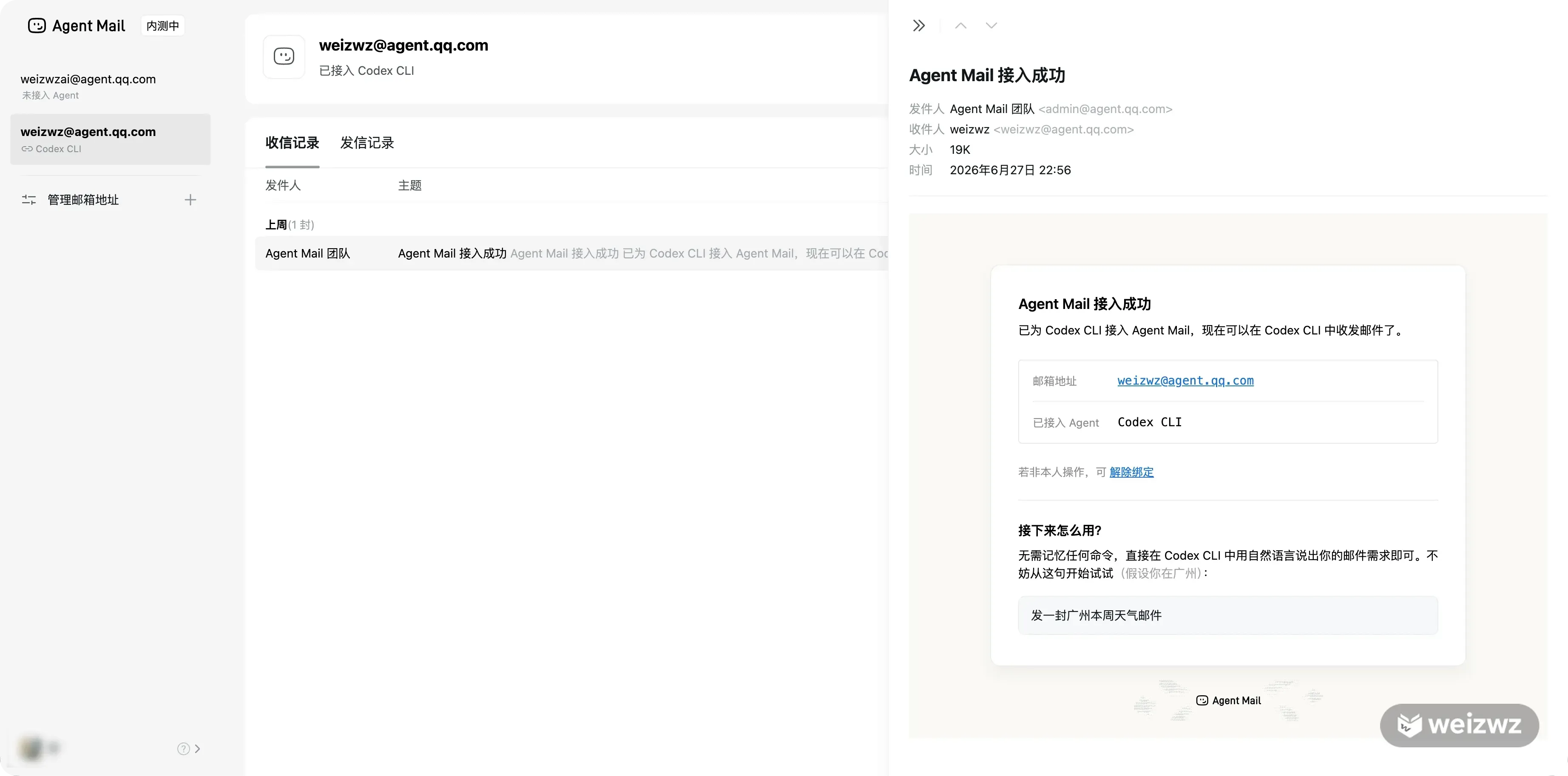
The official documentation currently lists support for WorkBuddy, QClaw, Marvis, OpenClaw, Claude Code, Kimi Work, Doubao’s Super Mode, Codex, Hermes, Cursor, and other agent products.
A test connection through Codex produced the following address:
[email protected]
The service appears to allow each person to apply for two mailboxes. An ID must currently be at least six characters long. The documentation says that an address can be changed once, after which the old address becomes invalid. However, no option for changing the ID was found during testing. Deleting an account does not appear to make a new address available either; the previous address can only be restored.
That makes the initial choice more important than it may seem. Anyone hoping to reserve a short, memorable, or brand-oriented agent address should decide carefully before completing registration.
Connecting an agent
The setup process is intentionally agent-oriented. Instead of manually working through a long list of commands, users can give a supported agent the official instructions and ask it to complete the configuration.
For example, the following prompt was used in a Codex conversation:
请阅读 https://agent.qq.com/doc/cli-setup.md 文档,按照步骤为我安装并配置 Agent Mail CLI。
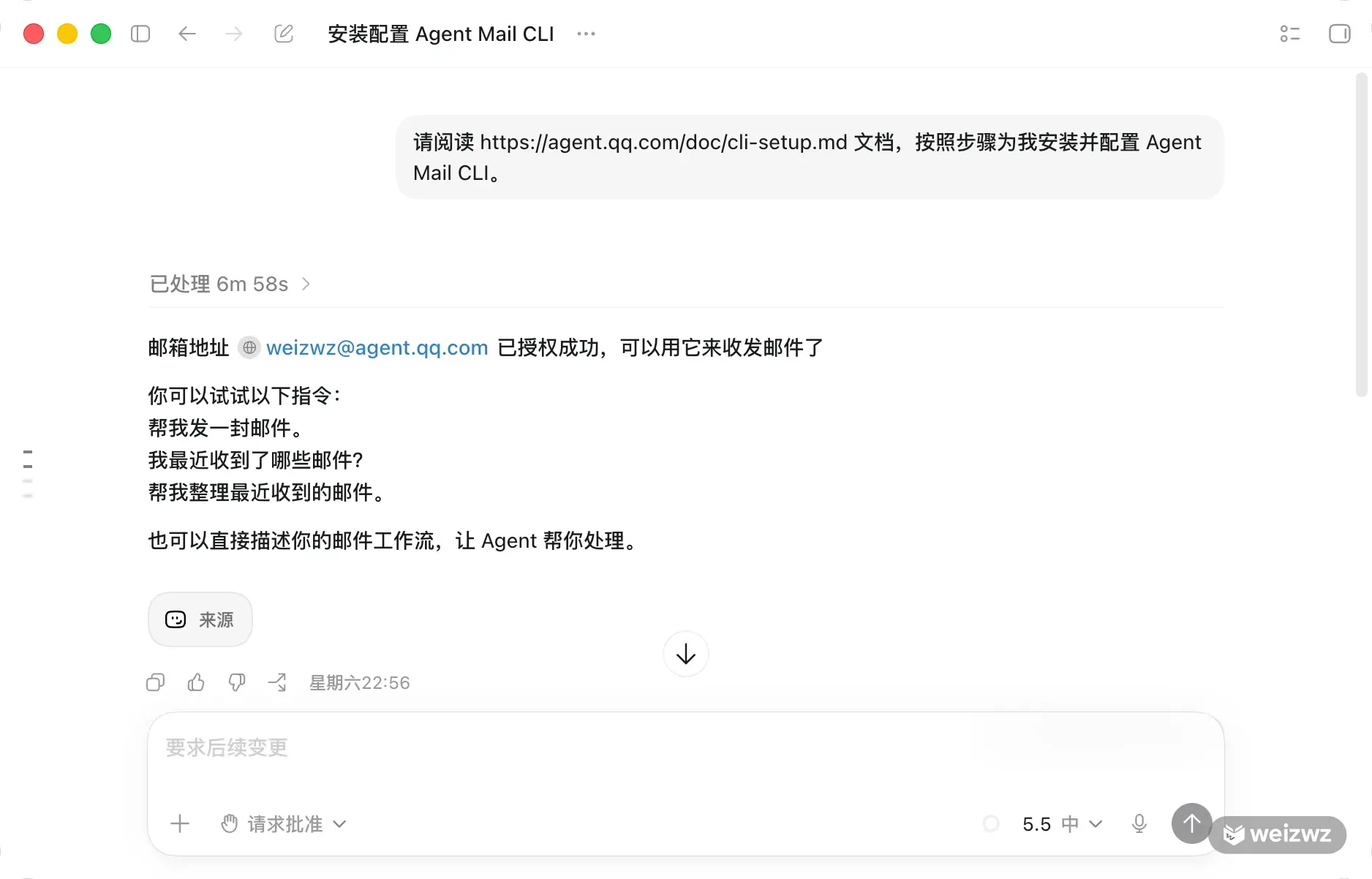
The full setup was not especially fast, largely because of network restrictions in the sandbox environment. In general, the process consists of four stages.
1. Read the setup instructions and inspect the environment
The agent first reads https://agent.qq.com/doc/cli-setup.md and checks the local environment. The documented sequence is to install @tencent-qqmail/agently-cli, install the Agent Mail skill, complete OAuth login, and then verify the account with agently-cli +me.
2. Install the CLI
The official installation command is:
npm install -g @tencent-qqmail/agently-cli
A sandbox network restriction blocked the first attempt in testing. Once access was allowed, installation completed successfully. The installed CLI reported version 1.0.6.
3. Install the Agent Mail skill
The skill can be installed with:
npx skills add https://agent.qq.com --skill -g -y
This gives the agent the instructions needed to work with Agent Mail. Those instructions cover sending, reading, and searching messages, downloading attachments, and identifying operations that require an additional confirmation.
In testing, the skill was installed in a location available to Codex:
~/.agents/skills/agently-mail
4. Complete OAuth authorization
The agent runs:
agently-cli auth login
It then returns an authorization link. Opening that link in a browser and scanning the QR code with WeChat completes the authorization process. The agent can verify the result with:
agently-cli +me
The verification output was:
邮箱地址 [email protected] 已授权成功,可以用它来收发邮件了
One environment-specific issue also appeared. Reading the system keychain from an ordinary sandbox produced keychain not initialized. Running the verification command again with authorization enabled allowed the credentials to be read normally.
This means that a keychain or credential error inside an agent environment does not necessarily indicate that authorization failed. It may simply mean the process does not have sufficient access to the local credential store.
Using natural language instead of commands
Once the connection is complete, users do not need to remember the CLI syntax. They can tell the agent what they want in ordinary language.
The supported operations include:
<table> <thead> <tr> <th>Task</th> <th>Example request</th> </tr> </thead> <tbody> <tr> <td>Send an email</td> <td>Ask the agent to send a message to[email protected] with specified content</td>
</tr>
<tr>
<td>Check the inbox</td>
<td>Ask what messages arrived recently</td>
</tr>
<tr>
<td>Search messages</td>
<td>Find the email about project progress from last week</td>
</tr>
<tr>
<td>Delete a message</td>
<td>Delete the email with a particular subject</td>
</tr>
<tr>
<td>Reply</td>
<td>Reply to the previous message and tell the sender it was received</td>
</tr>
<tr>
<td>Send an attachment</td>
<td>Email someone and attach a specified file</td>
</tr>
<tr>
<td>Download an attachment</td>
<td>Download the attachment from the message with a particular subject</td>
</tr>
</tbody>
</table>
A more complete test asked the agent to find the weather forecast for Xi’an for the current week and send the result by email.
The initial request was:
发一封西安本周天气邮件
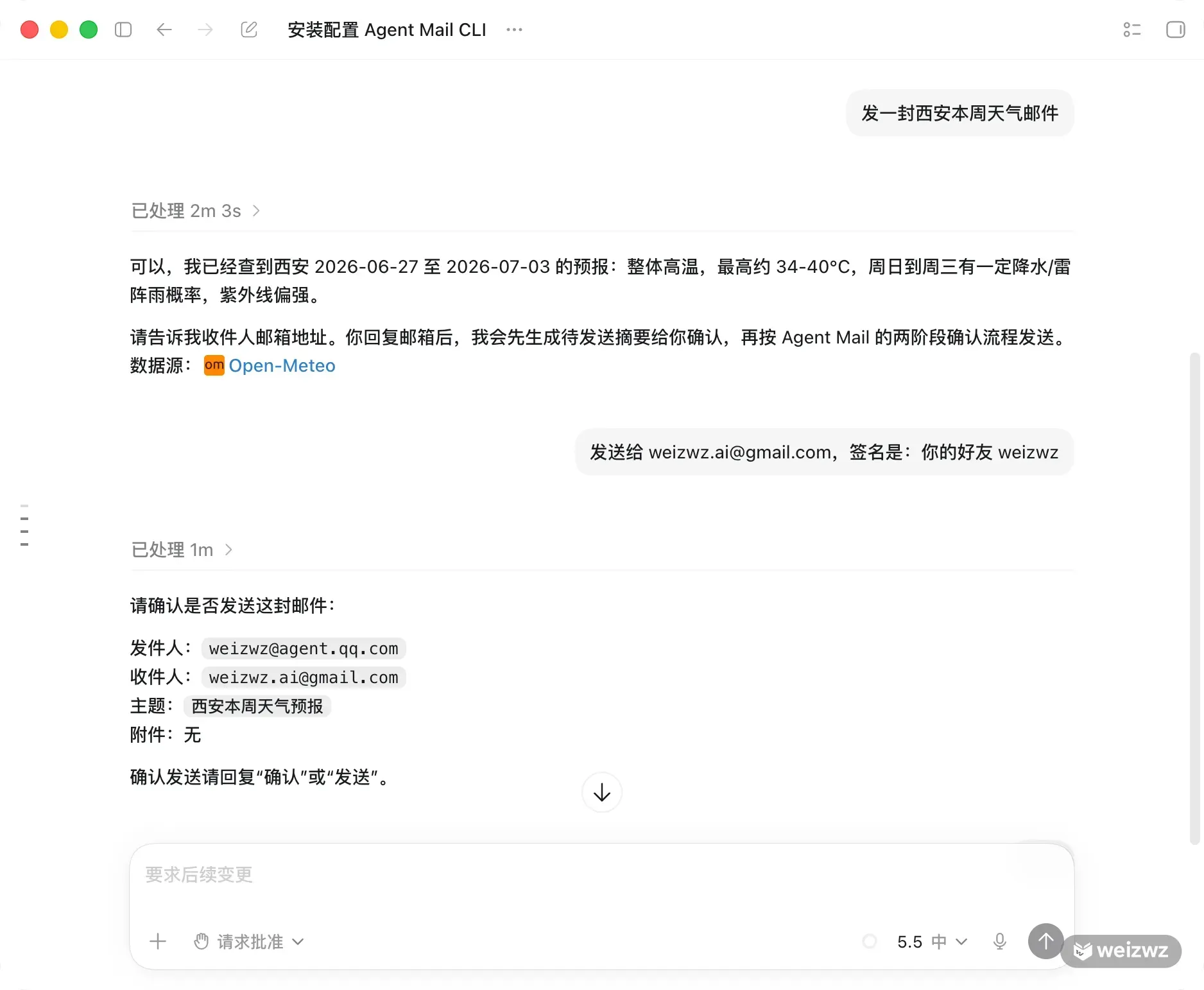
Because weather is time-sensitive information, the agent first attempted to use its built-in weather function and then switched to a public weather interface. It eventually retrieved a forecast for Xi’an covering June 27 to July 3, 2026. The forecast showed generally high temperatures, with highs of roughly 34–40°C, along with some possibility of rain or thunderstorms from Sunday through Wednesday. Ultraviolet radiation was expected to be strong.
The agent then asked for the recipient. The reply was:
发送给 [email protected],签名是:你的好友 weizwz
Confirmation before external actions
The most reassuring part of the test was Agent Mail’s two-stage confirmation process for write operations.
When the agent first attempted to send the message, it did not deliver the email immediately. Instead, it generated a confirmation summary similar to this:
发件人:[email protected]
收件人:[email protected]
主题:西安本周天气预报
附件:无
It then paused and waited for an explicit response. Only after receiving:
发送
did it carry out the second stage and return:
已发送,邮件已进入发送队列。
This design matters because email is an external communication channel. A wrong recipient, incorrect content, or accidental attachment can cause real problems. Sending, replying, forwarding, and moving messages to the trash are treated as write operations that require confirmation, preventing the agent from making a decision and executing it within the same uninterrupted exchange.
That separation between preparation and execution is also what makes the service more suitable for practical automation. The agent can gather information and prepare a message, while the user retains control over the final external action.
Where Agent Mail could be useful
The most interesting applications are not limited to asking an agent to send a single email. Agent Mail becomes more useful when it is placed inside a recurring workflow, for example:
- Subscribe the agent mailbox to industry newsletters, have the agent extract the important points each day, and forward a digest to a personal mailbox.
- Ask the agent to search for messages about a particular topic on a schedule and send daily or weekly reports.
- Forward invoice emails to Agent Mail so the agent can extract attachments or invoice links and organize them in a spreadsheet.
- Automatically forward emails that need AI processing from a personal mailbox to Agent Mail, allowing the agent to classify them, summarize their contents, download attachments, and rename files.
- Assign a separate Agent Mail address to a project, then route messages from external systems, forms, or monitoring alerts to that address for centralized processing.
These workflows could previously be assembled with scripts, but doing so required more technical work. Agent Mail combines the mailbox, authorization, CLI, agent skill, and confirmation system in one package. For ordinary users, the main interface can simply be a natural-language request.
Questions that came up during testing
Does it use a personal QQ Mail account?
No. The official documentation describes Agent Mail as an independently created mailbox service. The agent address is separate from a personal mailbox, and the two do not affect each other.
This separation is important. Agent Mail is closer to a work mailbox assigned to an agent than to handing an agent direct access to a user’s private inbox.
Where are the agent mailboxes managed?
Mailbox addresses can be managed at:
https://agent.qq.com
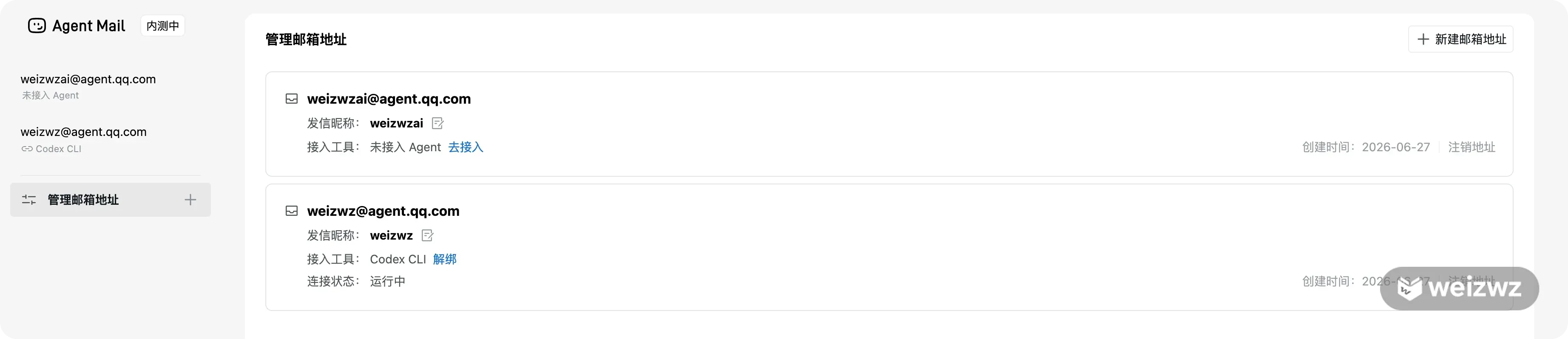
Can an address be changed?
According to the documentation, an address can be changed once, and the original address becomes invalid afterward. During testing, however, no visible entry point for changing the ID was found. Anyone who cares about having a short, memorable, or recognizable address should therefore make the initial choice carefully.
Can several agents on one computer use different addresses?
The current FAQ says that multiple agents running on the same computer can share only one Agent Mail address. Using different addresses requires using different computer devices.
What if QR-code login fails?
The documented recommendations are:
- Copy the authorization link generated by the agent exactly as provided and open it in a browser without modifying it.
- If the link has expired, ask the agent to generate a new one.
A request such as the following can be used:
请帮我生成新的 Agent Mail 的授权链接
Could the agent send a message by mistake?
In testing, sending was not executed immediately. The agent first returned a summary and waited for an explicit confirmation such as “confirm” or “send.” Only then was the message submitted.
That second confirmation is one of Agent Mail’s most important safety features, especially as the service is intended to let agents interact with people and systems outside the chat environment.
Is it worth setting up now?
For users already working with Codex, Claude Code, Cursor, Kimi Work, Doubao’s Super Mode, or similar agent products, Agent Mail is worth trying. Even if the initial goal is only experimentation, reserving a preferred mailbox ID may be sensible given the current limitations around changing or re-registering addresses.
An email address may look like a small feature on its own. But once an agent can reliably receive and send messages—with a separate identity, tool access, and confirmation before external actions—it begins to function less like a conversational assistant and more like a participant in an actual workflow.