Update
Update on January 7:
A comment from 面条, along with a discussion with blogger hary, helped me realize that I had been looking at the wrong root cause. The issue was not actually an MX/CNAME conflict itself. The real problem was my DNSPod line-based DNS setup: for the @ record, overseas traffic was being resolved via CNAME to Vercel, which meant emails sent from overseas could not be delivered to my mailbox properly.
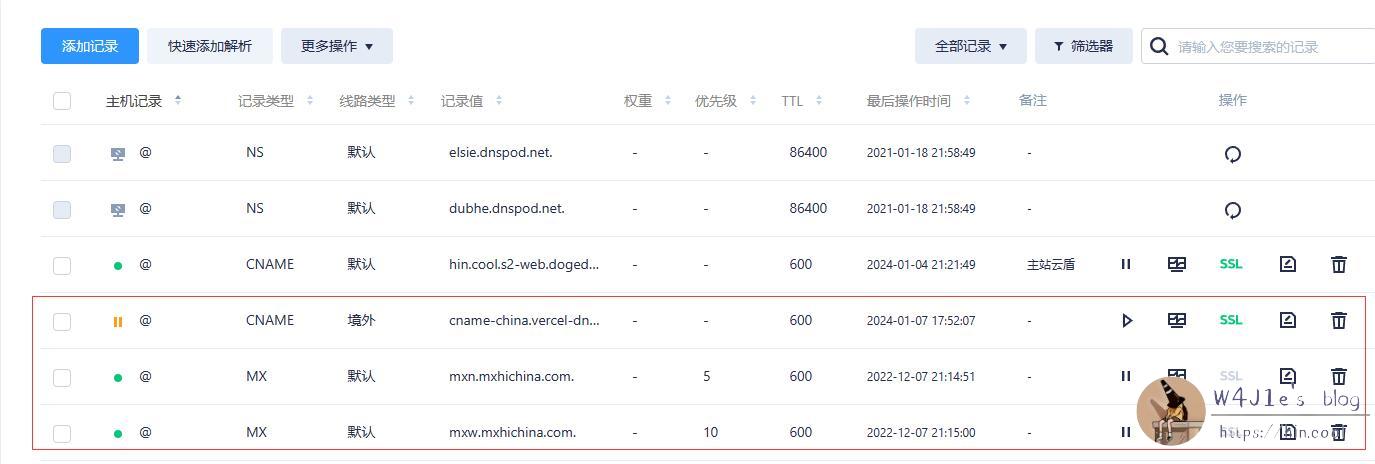
Disabling the overseas line for that record solves it in practice, and adding a dedicated overseas MX line should also work in theory.
How this started
I had previously compared a few free business email services and eventually chose Alibaba Cloud for my domain email.
I mainly use that mailbox for blog comment notifications, and under normal circumstances sending and receiving worked fine. The problem only surfaced after I failed to receive mail from one specific service, which kicked off a long troubleshooting session.
The symptom: only one service seemed broken
Gravatar hardly needs an introduction. Back in 2021, I registered an account with my domain email address, admin#hin.cool, and uploaded an avatar. At the time I was using Tencent Exmail, and the registration email from Gravatar arrived without any issue.
Recently, I wanted to log back in and change the avatar. But I had forgotten the password, and Gravatar’s default login flow sends a sign-in link to the registered email address. That was when I discovered I was no longer receiving those emails at all, so I had no way to access the account.
The first round of troubleshooting
At first, I assumed the issue must be on the mail provider side. Since my mailbox could still send and receive most email normally, I suspected Alibaba Cloud might be blocking messages from that service for policy reasons, especially considering that Gravatar’s domain is itself blocked in some contexts.
After contacting Alibaba Cloud support, I was told clearly that they were not filtering or restricting those messages. So my suspicion shifted to a possible conflict between MX and CNAME records.
I then contacted Tencent Cloud, which I use for DNS. Their response was that DNSPod supports cname flattening by default, but only when all of the following requirements are met:
1.前后域名都要在dnspod, 2.cname 和 mx 记录都要存在, 3.cname 记录,前后域名,包括整个 cname 解析线路的域名,都要开启 cname 加速。
During the phone call, support asked which CDN I was using. Once they learned it was not Tencent Cloud CDN, the answer was immediate: “then it definitely won’t be supported.”
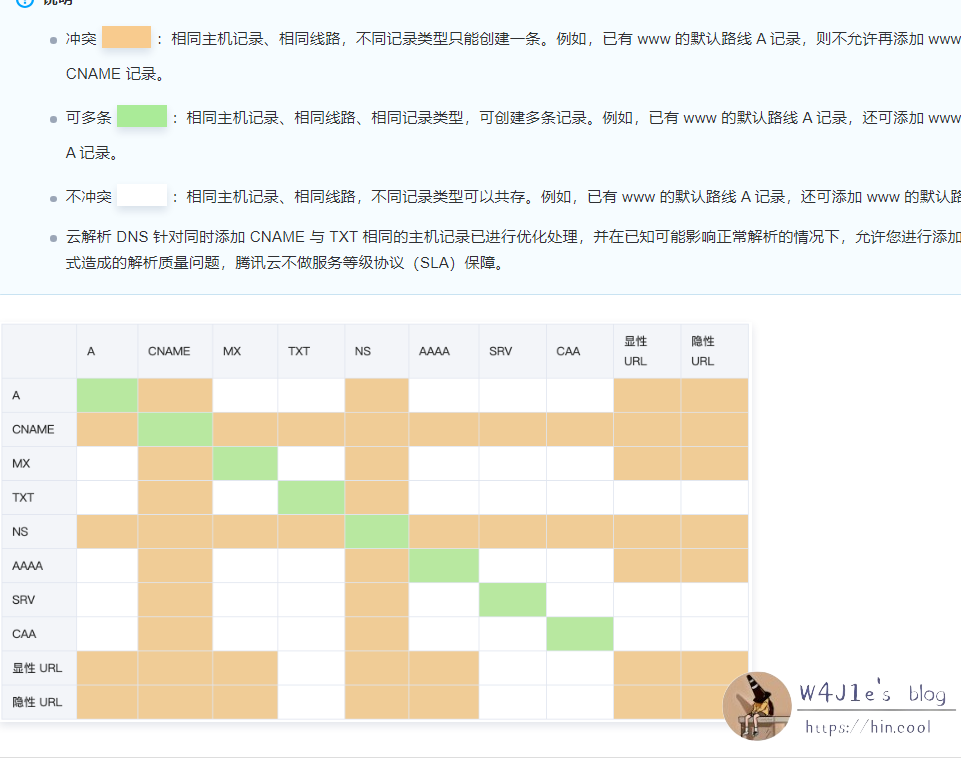
At that point, the obvious ways around a conflict seemed to be these:
- Move the blog to
www, and use an explicit URL redirect for@; - Keep the blog on the root domain, but move MX to a subdomain;
- Keep the blog on the root domain, and point
@to an IP address so it no longer conflicts with MX.
I didn’t like the first two options.
I had only recently moved the blog from www to the root domain, so switching back felt pointless. And moving email to a subdomain would require changing my email address, which would not solve the Gravatar login problem anyway. Worse, it could break other accounts that I had registered using the root-domain mailbox.
The third option was clearly the best one, except for one practical issue: my CDN did not provide IP-based resolution.
Trying support didn’t really help
With DNS still unresolved, I had no choice but to contact Gravatar using a personal email address.
After writing to support, I did receive one reply. But when I answered, nothing else came back. Later, I eventually found an account recovery form on a WordPress support page. I filled it out and got an automated email in return, followed by another response that was not much different from the earlier support reply and did not offer any real solution.
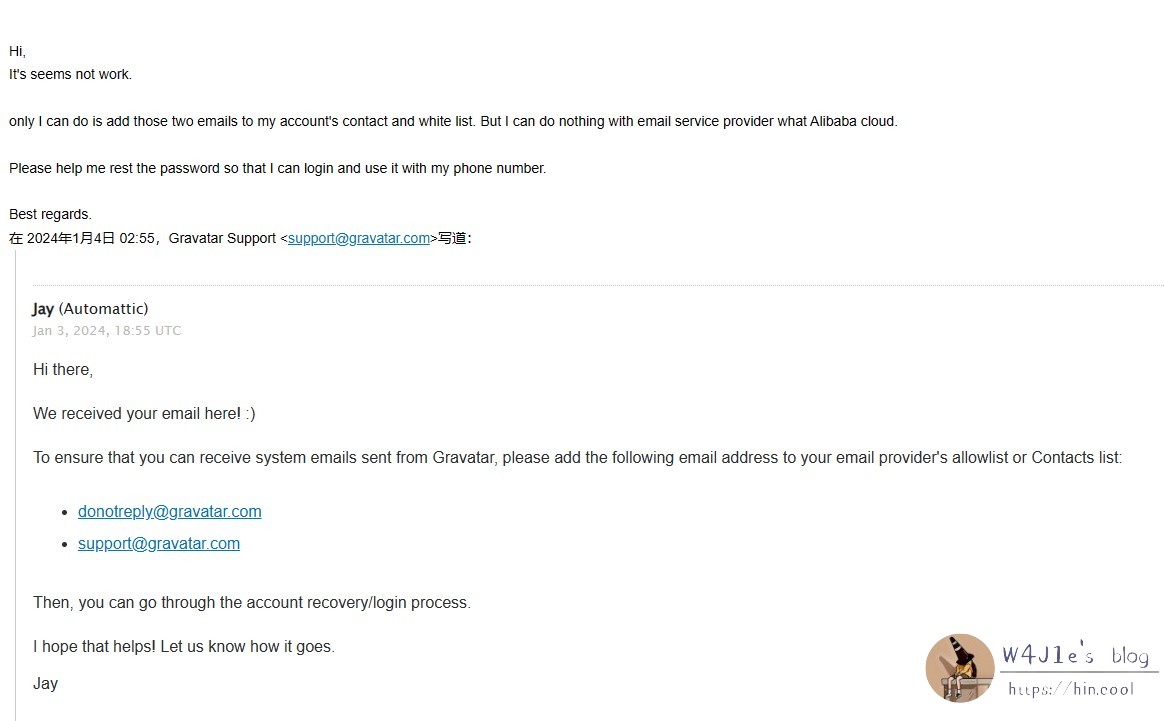
In the recovery form, I had already explained the problem in detail. I also provided information such as the account’s registration time and some of the service-specific verification details they ask for, such as a linked credit card or the code from the original registration email. Apparently, that still was not enough for them to confirm I was the real owner of the account.
What finally fixed it
While waiting for another response that never came, I suddenly remembered Vercel.
Vercel provides IP resolution.
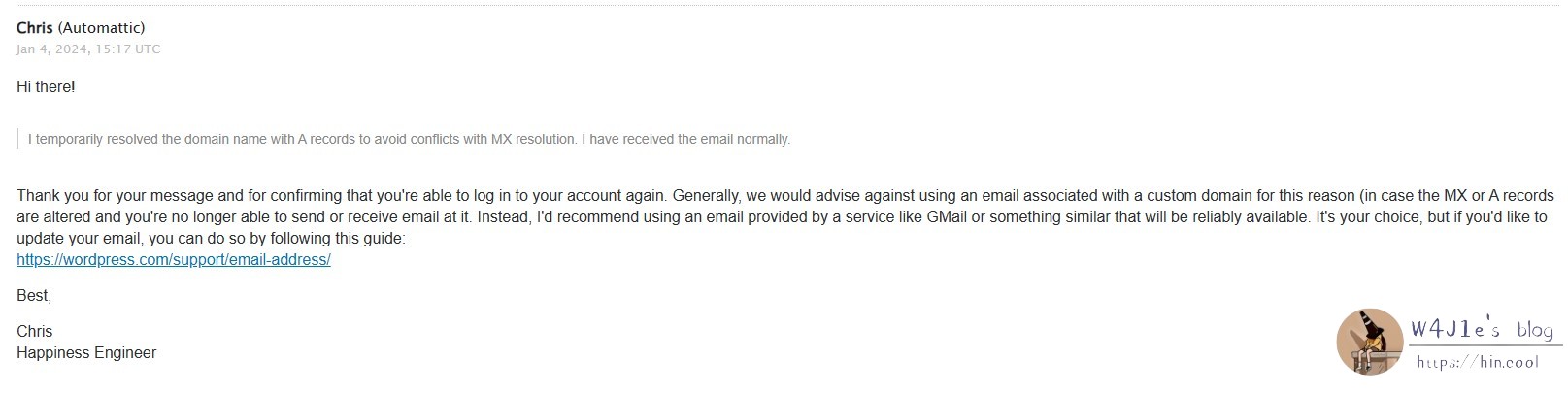
My blog uses split DNS: domestic traffic resolves to a mainland CDN, while overseas traffic resolves to Vercel. I temporarily disabled the domestic resolution and pointed the default resolution to Vercel’s IP instead. As soon as I did that, the record conflict warning on Alibaba Cloud’s side disappeared.
Then I tried logging into Gravatar again.
The email arrived immediately.
After resetting the password, I made sure to remember the new one and also added a backup email so I would not get trapped by the same recovery issue again.
What I took away from this
A lot of bloggers use custom domain email addresses, and many of them use the root domain as the mailbox suffix. I still do not know how many of them have run into the same problem.
Looking back, it now makes sense why I was able to receive Gravatar’s registration email in the beginning. At that time, my blog was still resolving through www, and the root domain was only doing a 301 redirect. After I changed the setup, incoming mail started failing. So this was not a case of Tencent Exmail losing messages back then or Alibaba Cloud blocking them now. The underlying issue was in DNS resolution.
If you plan to use a domain email address in the future, it is worth thinking through the DNS layout from the start. Choosing a structure you are comfortable with early on can save you from running into messy MX and CNAME conflicts later—or, as I learned, what looks like such a conflict but is actually a line-based DNS routing problem.