Containerized applications have become a standard part of cloud-native infrastructure, and as Kubernetes clusters grow, cross-host communication stops being optional. In Kubernetes, Pods are the smallest schedulable unit, and networking is one of the foundations everything else depends on. When workloads need to communicate not only across nodes but also with systems outside the cluster, the network design has to account for both internal and external routing.
Calico addresses this by using BGP to distribute routes for container networks. Compared with overlay approaches built on VXLAN, Calico avoids packet encapsulation and decapsulation, which improves transmission efficiency and throughput. In practice, that makes it a good fit when you want Pod IPs to be reachable directly from the local network.
Why this setup was needed
In the existing environment, Pods and nodes inside the cluster could already reach each other directly through Pod IPs. Containers could also access virtual machines without trouble. The missing piece was the reverse path: virtual machines could not access containers.
That became especially limiting for services registered through Consul, because service-to-service calls depended on real connectivity between the VM side and the Pod side. The goal was straightforward: make Pod IPs reachable from virtual machines so that workloads on both sides could call each other directly.
Reference used for this setup:
https://docs.projectcalico.org/archive/v3.8/networking/bgp
Enabling Pod network reachability with Calico BGP
1. Install calicoctl on a Kubernetes master node
curl -O -L https://github.com/projectcalico/calicoctl/releases/download/v3.8.9/calicoctl
chmod +x calicoctl
mv calicoctl /usr/bin/calicoctl
2. Add the calicoctl configuration
Create the configuration directory and point calicoctl at the Kubernetes datastore:
mkdir /etc/calico
cat > /etc/calico/calicoctl.cfg <<EOF
apiVersion: projectcalico.org/v3
kind: CalicoAPIConfig
metadata:
spec:
  datastoreType: "kubernetes"
  kubeconfig: "/root/.kube/config"
EOF
# 测试
calicoctl version
Client Version:    v3.8.9
Git commit:        0991d2fb
Cluster Version:   v3.8.9
# 出现此行代表配置正确
Cluster Type:      k8s,bgp,kdd
# 出现此行代表配置正确
If Cluster Version and Cluster Type: k8s,bgp,kdd appear, the configuration is working.
3. Configure route reflectors in the cluster
In this environment, the Kubernetes master nodes were used as route reflectors. Worker nodes would peer with the masters, and the master nodes would also peer with one another.
First, check the node list:
# 在本环境下将kubernetes master节点作为反射器使用
# 查看节点信息
[root@master1 node]# kubectl get node
NAME      STATUS   ROLES                  AGE     VERSION
master    Ready    control-plane,master   3h19m   v1.22.4
node1     Ready    <none>                 3h16m   v1.22.4
node2     Ready    <none>                 3h15m   v1.22.4
Then export the master node definitions:
# 导出Master节点配置(多个导出)
calicoctl get node k8s-test-master-1.fjf --export -o yaml > k8s-test-master-1.yml
calicoctl get node k8s-test-master-2.fjf --export -o yaml > k8s-test-master-2.yml
calicoctl get node k8s-test-master-3.fjf --export -o yaml > k8s-test-master-3.yml
calicoctl get node master --export -o yaml > k8s-test-master-1.yml
Add the following fields to each master node definition so Calico recognizes them as route reflectors:
# 在3个Master节点配置中添加以下配置用于标识该节点为反射器
metadata:
......
  labels:
......
    i-am-a-route-reflector: true
......
spec:
  bgp:
......
    routeReflectorClusterID: 224.0.0.1
Apply the updated node configuration:
# 更新节点配置
calicoctl apply -f k8s-test-master-1.yml
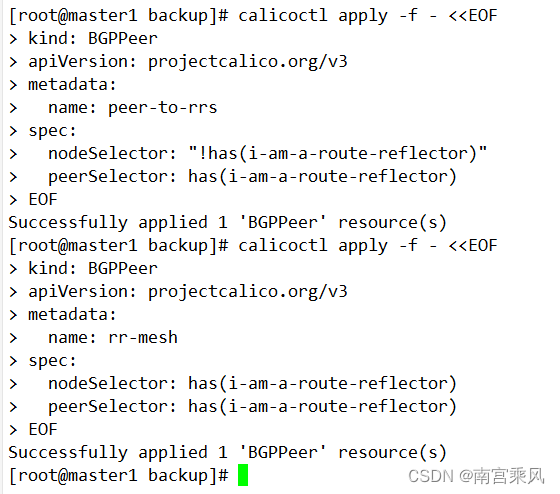
Next, configure all non-reflector nodes to peer with the reflectors:
# 其他节点与反射器对等
calicoctl apply -f - <<EOF
kind: BGPPeer
apiVersion: projectcalico.org/v3
metadata:
  name: peer-to-rrs
spec:
  nodeSelector: "!has(i-am-a-route-reflector)"
  peerSelector: has(i-am-a-route-reflector)
EOF
Finally, configure the route reflectors to peer with each other:
# 反射器彼此对等
calicoctl apply -f - <<EOF
kind: BGPPeer
apiVersion: projectcalico.org/v3
metadata:
  name: rr-mesh
spec:
  nodeSelector: has(i-am-a-route-reflector)
  peerSelector: has(i-am-a-route-reflector)
EOF
4. Peer the master route reflectors with the core switch
Once the masters are acting as route reflectors inside the cluster, they can be peered with the external BGP device. In this case, the peer is a core switch at 192.168.83.1:
calicoctl apply -f - <<EOF
apiVersion: projectcalico.org/v3
kind: BGPPeer
metadata:
  name: rr-border
spec:
  nodeSelector: has(i-am-a-route-reflector)
  peerIP: 192.168.83.1
  asNumber: 64512
EOF
# peerIP: 核心交换机IP
# asNumber: 用于和核心交换机对等的ID
5. Configure BGP on the core switch
The opposite side of the session must also be configured. In this environment, the external BGP device was a Cisco 3650 core switch:
router bgp 64512
bgp router-id 192.168.83.1
neighbor 192.168.83.36 remote-as 64512
neighbor 192.168.83.49 remote-as 64512
neighbor 192.168.83.54 remote-as 64512
6. Verify BGP peering status
Use calicoctl node status to confirm all peers have reached Established:
calicoctl node status
# INFO字段全部为Established 即为正常
Calico process is running.

IPv4 BGP status
+---------------+---------------+-------+----------+-------------+
| PEER ADDRESS  | PEER TYPE     | STATE | SINCE    | INFO        |
+---------------+---------------+-------+----------+-------------+
| 192.168.83.1  | node specific | up    | 06:38:55 | Established |
| 192.168.83.54 | node specific | up    | 06:38:55 | Established |
| 192.168.83.22 | node specific | up    | 06:38:55 | Established |
| 192.168.83.37 | node specific | up    | 06:38:55 | Established |
| 192.168.83.49 | node specific | up    | 06:38:55 | Established |
| 192.168.83.52 | node specific | up    | 06:38:55 | Established |
+---------------+---------------+-------+----------+-------------+

IPv6 BGP status
No IPv6 peers found.
7. Test access to Pod IPs from another subnet
A successful test in this setup was done from a VM in the 192.168.82.0/24 network by pinging a Pod IP directly. If the ping works, the Pod network has been exposed correctly through BGP:
[dev][[email protected] ~]# ping -c 3 172.15.190.2
PING 172.15.190.2 (172.15.190.2) 56(84) bytes of data.
64 bytes from 172.15.190.2: icmp_seq=1 ttl=62 time=0.677 ms
64 bytes from 172.15.190.2: icmp_seq=2 ttl=62 time=0.543 ms
64 bytes from 172.15.190.2: icmp_seq=3 ttl=62 time=0.549 ms

--- 172.15.190.2 ping statistics ---
3 packets transmitted, 3 received, 0% packet loss, time 2000ms
rtt min/avg/max/mdev = 0.543/0.589/0.677/0.067 ms
[dev][[email protected] ~]#
Extending the Service network as well
Making Pod IPs reachable solves only part of the problem. In many production environments, services are exposed through Ingress, NodePort, or HostNetwork. Those approaches are stable and secure enough for production, but they can be inconvenient in an internal development environment.
Developers often want to access their own services directly, but Pod IPs are ephemeral. In that case, it is much more convenient to use a stable Service IP or even resolve services by name. The next goal, then, is to make the Kubernetes Service network reachable from outside the cluster.
Reference for this part:
https://docs.projectcalico.org/archive/v3.8/networking/service-advertisement
One prerequisite applies here: the Pod network must already be advertised over BGP, or BGP peering must already be established.
Advertising Service CIDRs with Calico
1. Confirm the Service CIDR
First, determine the cluster's Service IP range:
[root@master1 node]# kubectl cluster-info dump|grep -i "service-cluster-ip-range"
                    "--service-cluster-ip-range=172.16.0.0/16",
                    "--service-cluster-ip-range=172.16.0.0/16",
Here, the Service CIDR is 172.16.0.0/16.
2. Enable Service route advertisement
Patch the calico-node DaemonSet so Calico advertises the Service network:
[root@master1 ~]# kubectl patch ds -n kube-system calico-node --patch '{"spec": {"template": {"spec": {"containers": [{"name": "calico-node", "env": [{"name": "CALICO_ADVERTISE_CLUSTER_IPS", "value": "172.16.0.0/16"}]}]}}}}'
daemonset.apps/calico-node patched
Under normal conditions, once BGP advertisement is enabled, the core switch should learn the routes within about three minutes.
3. Test external access to a ClusterIP service
A simple validation method is to use the cluster DNS service. First, identify the kube-dns Service:
# 找到集群DNS服务进行测试
kubectl get svc kube-dns -n kube-system
NAME       TYPE        CLUSTER-IP    EXTERNAL-IP   PORT(S)                  AGE
kube-dns   ClusterIP   172.16.0.10   <none>        53/UDP,53/TCP,9153/TCP   3d21h
Then, from outside the cluster, send a reverse DNS query to that Service IP. In this example, a VM queried 172.16.0.10 to resolve a Pod IP. A successful answer shows that the Service network is reachable from outside:
# 找一个Pod IP在集群外进行解析测试,如果可以解析到结果说明SVC网络已经打通
[dev][[email protected] ~]# dig -x 172.15.190.2 @172.16.0.10

; <<>> DiG 9.9.4-RedHat-9.9.4-61.el7_5.1 <<>> -x 172.15.190.2 @172.16.0.10
;; global options: +cmd
;; Got answer:
;; ->>HEADER<<- opcode: QUERY, status: NOERROR, id: 23212
;; flags: qr aa rd; QUERY: 1, ANSWER: 1, AUTHORITY: 0, ADDITIONAL: 1
;; WARNING: recursion requested but not available

;; OPT PSEUDOSECTION:
; EDNS: version: 0, flags:; udp: 4096
;; QUESTION SECTION:
;2.190.15.172.in-addr.arpa.    IN      PTR

;; ANSWER SECTION:
2.190.15.172.in-addr.arpa. 30  IN      PTR     172-15-190-2.ingress-nginx.ingress-nginx.svc.k8s-test.fjf.
# 可以正常解析到主机记录

;; Query time: 3 msec
;; SERVER: 172.16.0.10#53(172.16.0.10)
;; WHEN: Fri Jul 09 15:26:55 CST 2021
;; MSG SIZE  rcvd: 150
At that point, both Pod routes and Service routes are available beyond the cluster boundary. Virtual machines on the LAN can reach Pod IPs directly, and internal development machines can use Service IPs or Service names to access workloads inside Kubernetes.