Release time tends to be when bugs suddenly show up all at once, and that pressure is something most experienced developers know too well. Unity’s built-in automated testing support made that situation much easier to deal with, because it removed the need to bring in a third-party automation testing plugin just to build a workable test flow. What follows is a practical overview of the key parts of Unity3D automated testing, with enough detail to get oriented quickly.
Automated testing across multiple platforms
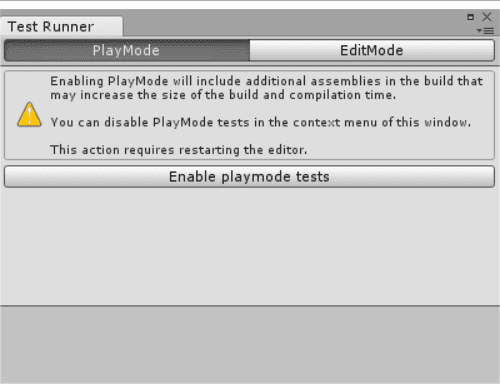
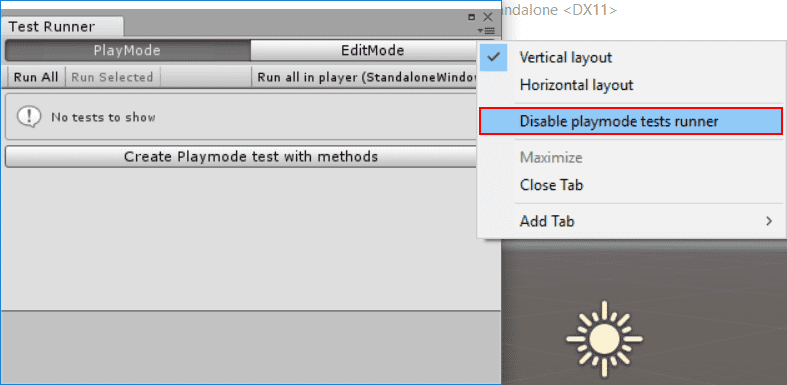
Unity’s Test Runner can be used with platforms such as Standalone, Android, and iOS. You can open it from Window > Test Runner.
The Test Runner is built on Unity’s integrated unit testing framework, which is based on the open-source .NET testing library NUnit.
One of the most important additions Unity makes on top of standard NUnit is UnityTestAttribute. This kind of test can skip frames during execution, which makes it possible to wait for background work to finish. In Edit Mode, UnityTestAttribute runs as a coroutine through the EditorApplication.update callback loop; in Play Mode, it behaves accordingly in runtime testing.
Known issues and limitations
There are still several constraints to keep in mind when using the Unity Test Runner:
UnityTestAttributeis not supported on WebGL or WSA.- AOT platforms are not currently supported by the test runner.
UnityTestdoes not support parameterized tests, except forValueSource.- Automated testing for platform players launched from the command line, such as Standalone, Android, or iOS, is not currently supported.
- For Edit Mode tests, you must create a folder named
Editorto store them.
Core usage and examples
Test and UnityTest
A regular Test can be used both in the editor and while running:
1 2 3 4 5 6</th>
<th>[Test] public void GameObject_CreatedWithGiven_WillHaveTheName() { var go = new GameObject("MyGameObject"); Assert.AreEqual(“MyGameObject”, go.name); }</th>
</tr>
</thead>
<tbody>
<tr>
<td></td>
<td></td>
</tr>
</tbody>
</table>
Use UnityTest when the test needs to run over time during play:
1 2 3 4 5 6 7 8 9 10 11</th>
<th>[UnityTest] public IEnumerator GameObject_WithRigidBody_WillBeAffectedByPhysics() { var go = new GameObject(); go.AddComponent<Rigidbody>(); var originalPosition = go.transform.position.y; yield return new WaitForFixedUpdate(); Assert.AreNotEqual(originalPosition, go.transform.position.y); }</th>
</tr>
</thead>
<tbody>
<tr>
<td></td>
<td></td>
</tr>
</tbody>
</table>
It can also be used in the editor:
<table> <thead> <tr> <th>1 2 3 4 5 6 7 8 9 10 11 12</th>
<th>[UnityTest] public IEnumerator EditorUtility_WhenExecuted_ReturnsSuccess() { var utility = RunEditorUtilityInTheBackgroud(); while (utility.isRunning) { yield return null; } Assert.IsTrue(utility.isSuccess); }</th>
</tr>
</thead>
<tbody>
<tr>
<td></td>
<td></td>
</tr>
</tbody>
</table>
The key difference is that methods marked with UnityTestAttribute execute like coroutines during testing.
UnityPlatform
This attribute lets you control which platforms a test applies to:
<table> <thead> <tr> <th>1 2 3 4 5 6 7 8 9 10 11 12 13</th>
<th>[Test] [UnityPlatform (RuntimePlatform.WindowsPlayer)] public void TestMethod1() { Assert.AreEqual(Application.platform, RuntimePlatform.WindowsPlayer); } [Test] [UnityPlatform(exclude = new[] {RuntimePlatform.WindowsEditor })] public void TestMethod2() { Assert.AreNotEqual(Application.platform, RuntimePlatform.WindowsEditor); }</th>
</tr>
</thead>
<tbody>
<tr>
<td></td>
<td></td>
</tr>
</tbody>
</table>
It is useful when behavior differs between runtime targets or when a test should explicitly exclude an editor environment.
PrebuildSetup
If a test needs extra preparation before it runs, use PrebuildSetupAttribute. You do this by specifying a class that implements the IPrebuildSetup interface.
This is especially useful when the entire test class depends on setup code that must run before testing begins, such as preparing assets or configuring resources required by a specific test.
In practice, you just implement IPrebuildSetup and apply the PrebuildSetup attribute so the data or resources needed by the unit test can be prepared in advance.
1 2 3 4 5 6 7 8 9 10 11 12 13 14 15</th>
<th>public class TestsWithPrebuildStep : IPrebuildSetup { public void Setup() { // Run this code before the tests are executed } [Test] //PrebuildSetupAttribute can be skipped because it's implemented in the same class [PrebuildSetup(typeof(TestsWithPrebuildStep))] public void Test() { (...) } }</th>
</tr>
</thead>
<tbody>
<tr>
<td></td>
<td></td>
</tr>
</tbody>
</table>
PrebuildSetup code runs before entering Play Mode or before building the player. Since setup code can use the UnityEditor namespace and related editor-only APIs, it must either be placed inside an Editor folder or wrapped with #if UNITY_EDITOR to avoid compilation errors.
LogAssert
If anything other than normal logs or warnings is written to the console during a test, the test will fail by default. The LogAssert class allows you to declare which log messages are expected, preventing those expected messages from causing failures.
If an expected message never appears, the test also fails. In the same way, if a log or warning that is expected does not show up, the test is considered unsuccessful.
<table> <thead> <tr> <th>1 2 3 4 5 6 7 8 9 10 11 12 13</th>
<th>[Test] public void LogAssertExample() { //Expect a regular log message LogAssert.Expect(LogType.Log, "Log message"); //A log message is expected so without the following line //the test would fail Debug.Log("Log message"); //An error log is printed Debug.LogError("Error message"); //Without expecting an error log, the test would fail LogAssert.Expect(LogType.Error, "Error message"); }</th>
</tr>
</thead>
<tbody>
<tr>
<td></td>
<td></td>
</tr>
</tbody>
</table>
MonoBehaviourTest
MonoBehaviourTest is a wrapper designed for testing MonoBehaviour scripts, and it also works as a coroutine. You yield MonoBehaviourTest from a UnityTest, which instantiates the specified MonoBehaviour and waits until its execution is finished.
To define when the test is done, implement the IMonoBehaviourTest interface.
1 2 3 4 5 6 7 8 9 10 11 12 13 14 15 16 17 18 19</th>
<th>[UnityTest] public IEnumerator MonoBehaviourTest_Works() { yield return new MonoBehaviourTest<MyMonoBehaviourTest>(); } public class MyMonoBehaviourTest : MonoBehaviour, IMonoBehaviourTest { private int frameCount; public bool IsTestFinished { get { return frameCount > 10; } } void Update() { frameCount++; } }</th>
</tr>
</thead>
<tbody>
<tr>
<td></td>
<td></td>
</tr>
</tbody>
</table>
A small but important note
Every method marked with UnityTestAttribute is executed like a coroutine during testing.