ExFAT, short for Extended File Allocation Table File System, was introduced by Microsoft for Windows Embedded 6.0, including Windows CE 6.0 and Windows Mobile. It was designed primarily for flash storage and removable media, where users need to move large amounts of data between different devices and operating systems.
The file system is particularly suited to modern digital media. High-resolution photos, videos, and other large files often need to be stored and exchanged across cameras, computers, industrial equipment, tablets, and other products. Cloud storage can help with sharing, but removable media remains indispensable in many situations. ExFAT combines broad interoperability with support for very large files and storage volumes.
What distinguishes ExFAT from FAT?
Compared with the older FAT family, ExFAT provides several important improvements:
- It can scale to much larger volumes. The theoretical limit is 64 ZiB, while the recommended maximum is 512 TiB. By comparison, FAT32 is limited by its 32-bit design to a 2 TB partition when using 512-byte sectors.
- A single file can theoretically reach
2^64 - 1bytes, or 16 exbibytes minus one byte. FAT32 limits an individual file to2^32 - 1bytes, approximately 4 GiB, making ExFAT a practical option for files larger than 4 GB. - Cluster sizes can reach 32 MB. The sector-size exponent stored in the file system allows cluster configurations ranging from 512 bytes to 32 MB.
- Free-space allocation and deletion can be made more efficient through a free-space bitmap rather than relying only on traditional FAT-style allocation tracking.
- A single directory can contain more than
2^16files. - Access control lists are supported, although this capability was not available in Windows Vista SP1.
- OEM-defined parameters allow the file system to be adapted to different types of hardware and products.
- Transaction-Safe FAT, or TFAT, can be used on supported Windows CE systems to improve data integrity during hot-plug operations.
- Starting with Vista SP2, timestamps can use UTC rather than only the local time zone.
ExFAT is also a Microsoft-patented file system whose licensing has involved OEMs and device manufacturers. It has been used not only on desktop computers, but also in cameras, industrial equipment, mobile devices, tablets, and other products that require interoperable storage and file transfer.
Compatibility and other limitations
The main disadvantage of ExFAT is that compatibility is not universal, especially on older hardware and operating systems.
Some older devices, including certain personal digital assistants and digital cameras, cannot use ExFAT-formatted memory cards. Devices using ExFAT also could not use Windows Vista's ReadyBoost feature; newer ExFAT implementations in Windows 7 and later added ReadyBoost support.
Support has also varied across operating systems. Versions of Windows released before Windows XP SP3 did not support ExFAT. Windows XP could gain support by installing update KB955704. Older Linux systems generally required a third-party driver or implementation, such as exFAT tools, FUSE exFAT, exfat-nofuse, or sdfat. Mac OS X gained full ExFAT support after updating to version 10.6.5.
The licensing situation was historically less straightforward than that of many open file systems. Sharp, RIM, and Nintendo each reached ExFAT licensing agreements with Microsoft, and the technology involved patent fees. Code for an ExFAT kernel module associated with Samsung Android devices was also released under the Linux GPL license after being separated from a FUSE-based implementation. Samsung later released the corresponding module code formally.
In August 2019, Microsoft published the ExFAT technical documentation and supported integrating ExFAT functionality into the Linux kernel. Initial kernel support was planned for Linux 5.4.
ExFAT also presents a boot-related limitation. UEFI traditionally supports FAT and FAT32, but not ExFAT, so an EFI boot disk formatted as ExFAT may not be recognized. At the same time, modern operating-system installation media can contain individual files larger than 4 GB, such as Windows 10's install.wim or the SquashFS images used by Linux distributions. This creates a practical conflict: FAT and FAT32 are widely accepted for EFI booting, while their file-size limits may be too restrictive for some installation media.
The five main areas of an ExFAT volume
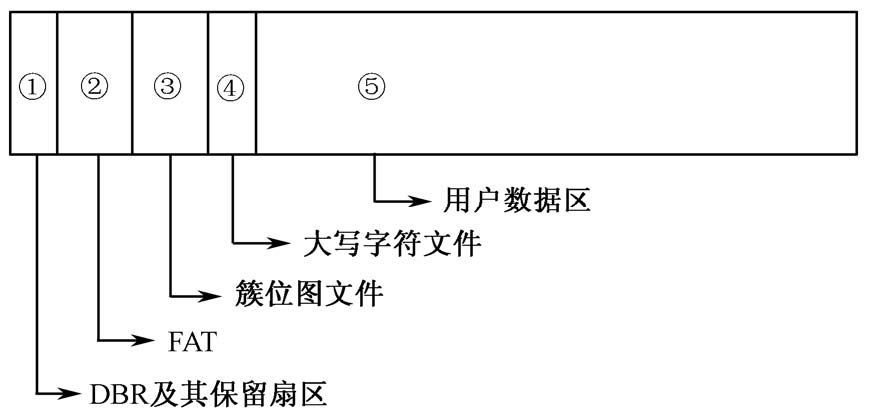
When a partition is formatted as ExFAT, its main structures are created in a defined order. The volume consists of the DBR and its reserved sectors, the FAT, the cluster bitmap file, the uppercase character file, and the user data area.
1. DBR and reserved sectors
DBR stands for DOS Boot Record and is also referred to as the operating-system boot record. Several reserved sectors usually follow the DBR. Sector 12 contains a backup copy of the DBR, which can be used for recovery if the primary boot record is damaged.
2. FAT
FAT means File Allocation Table. Unlike traditional FAT file systems, which commonly contain FAT1 and FAT2, ExFAT normally uses only one FAT.
3. Cluster bitmap file
The cluster bitmap is an ExFAT metadata file that records which clusters are in use. Its role is comparable to the $BitMap metadata file in NTFS. It allows the file system to track free and occupied clusters efficiently.
4. Uppercase character file
The uppercase character file is another ExFAT metadata file, roughly comparable to NTFS's $UpCase. Each character in the Unicode alphabet has a corresponding entry in this file. The data is used for case-insensitive comparison, sorting, and hash calculations.
Its size is fixed at 5,836 bytes.
5. User data area
This is the main storage area of the volume. User files and directories are stored here.
Reading the ExFAT DBR
The ExFAT DBR can be divided into six logical sections: the jump instruction, OEM identifier, reserved region, BIOS Parameter Block, boot code, and ending signature.
Jump instruction
The jump instruction occupies two bytes and redirects execution to the boot code. For example, EB 76 represents the assembly instruction JMP 76. Because the instruction itself takes two bytes, the jump calculation begins at the byte after the instruction. In this example, the next instruction to be executed is located at 78H. A NOP instruction, 90H, follows the jump instruction.
OEM identifier
This field occupies eight bytes. Its contents are selected by the OEM that created the file system. Microsoft Windows Vista, for example, stores the file system type ExFAT in this area.
Reserved region
Offsets 0x0B through 0x3F correspond to space traditionally occupied by the BPB in FAT file systems. ExFAT does not use these bytes for the same purpose.
BIOS Parameter Block
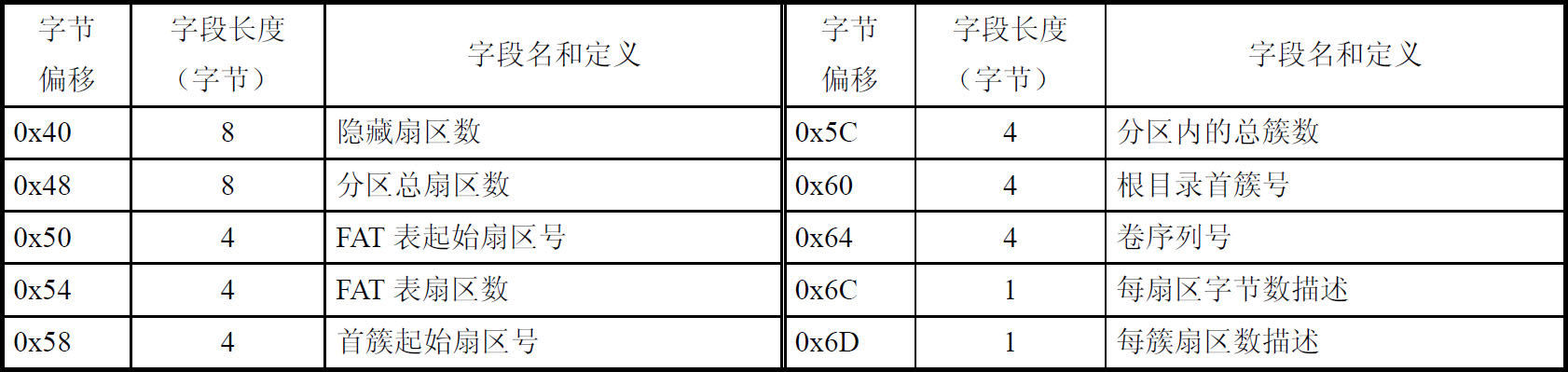
The ExFAT BPB, or BIOS Parameter Block, begins at offset 0x40 in the DBR and occupies 56 bytes. It records key information about the volume.
0x40–0x47: Hidden sector count
This eight-byte value records the number of sectors used before the current partition. It corresponds to the starting sector recorded in the partition table.
For a primary disk partition, the value represents the number of sectors between the MBR and the partition's DBR. For a logical drive inside an extended partition, it represents the number of sectors between the EBR and that partition's DBR.
0x48–0x4F: Total sector count
This eight-byte field stores the total number of sectors in the partition. Because it is 64 bits wide, the theoretical capacity calculated from 512-byte sectors is 2^64 × 512 = 2^73 bytes, or 8 ZB. Microsoft documentation describes ExFAT as theoretically supporting volumes up to 64 ZB, so the figure derived directly from this field is lower than the commonly cited theoretical limit.
0x50–0x53: FAT starting sector
This value gives the FAT's position relative to the beginning of the file system. In other words, it specifies how many sectors separate the DBR from the FAT.
0x54–0x57: FAT sector count
This field records the number of sectors occupied by the FAT. ExFAT normally contains only one FAT.
0x58–0x5B: First cluster heap sector
The value identifies the starting sector of the first cluster in the file system. As in traditional FAT file systems, the first usable cluster is cluster 2. Cluster 2 is normally assigned to the cluster bitmap file, so this value commonly points to the beginning of that file.
0x5C–0x5F: Total cluster count
This is the total number of clusters in the partition, counted from the first cluster in the data area to the end of the partition.
0x60–0x63: First cluster of the root directory
When a partition is formatted as ExFAT, the formatting program assigns a cluster in the data area as the starting point of the root directory and records its number in the BPB.
In a typical layout, the first cluster is used by the cluster bitmap file. The uppercase character file follows it, and the cluster after the uppercase character file becomes the starting cluster of the root directory.
0x64–0x67: Volume serial number
The formatting program generates this four-byte value when it creates the file system. It is a pseudo-random volume serial number used to identify the volume.
0x6C: Bytes-per-sector shift
This byte describes the number of bytes in each sector using an exponent. If the stored value is N, the sector size is 2^N bytes. For example, a value of 09 means that each sector contains 2^9 = 512 bytes.
0x6D: Sectors-per-cluster shift
This byte describes how many sectors make up a cluster, again using an exponent. If the value is N, the number of sectors per cluster is 2^N. A value of 06, for example, means 2^6 = 64 sectors per cluster.
With the supported sector and cluster parameters, ExFAT can use cluster sizes from 512 bytes up to 32 MB.
Boot code
The boot code occupies 390 bytes, from 78H through 1FDH. These bytes are essential to the ExFAT boot structure. If they are corrupted, the file system may become unusable.
Ending signature
The final signature of the ExFAT DBR is the same as that used by FAT: 55 AA.
Several reserved sectors follow the primary DBR, and sector 12 contains its backup. If the main DBR is damaged, the backup can be used as the basis for repair.