In Vue, two-way binding essentially means one thing: when data changes, the view updates; when the view changes, the data is updated as well.
At its core, this is implemented by combining data hijacking with the publisher–subscriber pattern. The data hijacking part relies on Object.defineProperty().
The basic idea
To make two-way binding work, several pieces cooperate with each other:
Intercepting object properties
- An
Observeris used to hijack and listen to every property. While doing so, it registers dependencies in a collector calledDep, and when data changes it sends out a notification. - A
Depinstance acts as the publisher. Its job is to collectWatchersubscribers and notify them when an update is needed. - A
Watcheracts as the subscriber. It receives change notifications passed along byObserverthroughDep, then runs its own bound callback—usually anupdatefunction—to refresh the UI. - A
Compilestep parses directives, initializes the view, subscribes to data changes, and binds the right update functions.
A key point here is dependency collection.
When a property from data is used in the template, that usage becomes a dependency. The same key can appear multiple times in the view, and each occurrence needs its own Watcher to keep it updated. Since one key may correspond to multiple watchers, a shared Dep is needed to manage them and notify them together when the value changes.
Another implementation detail worth noting is that template parsing works on a DocumentFragment rather than directly on the live DOM. A DocumentFragment is a lightweight document container with no parent node. Changes made to it do not immediately trigger DOM re-rendering, so it performs better than manipulating the DOM tree node by node.
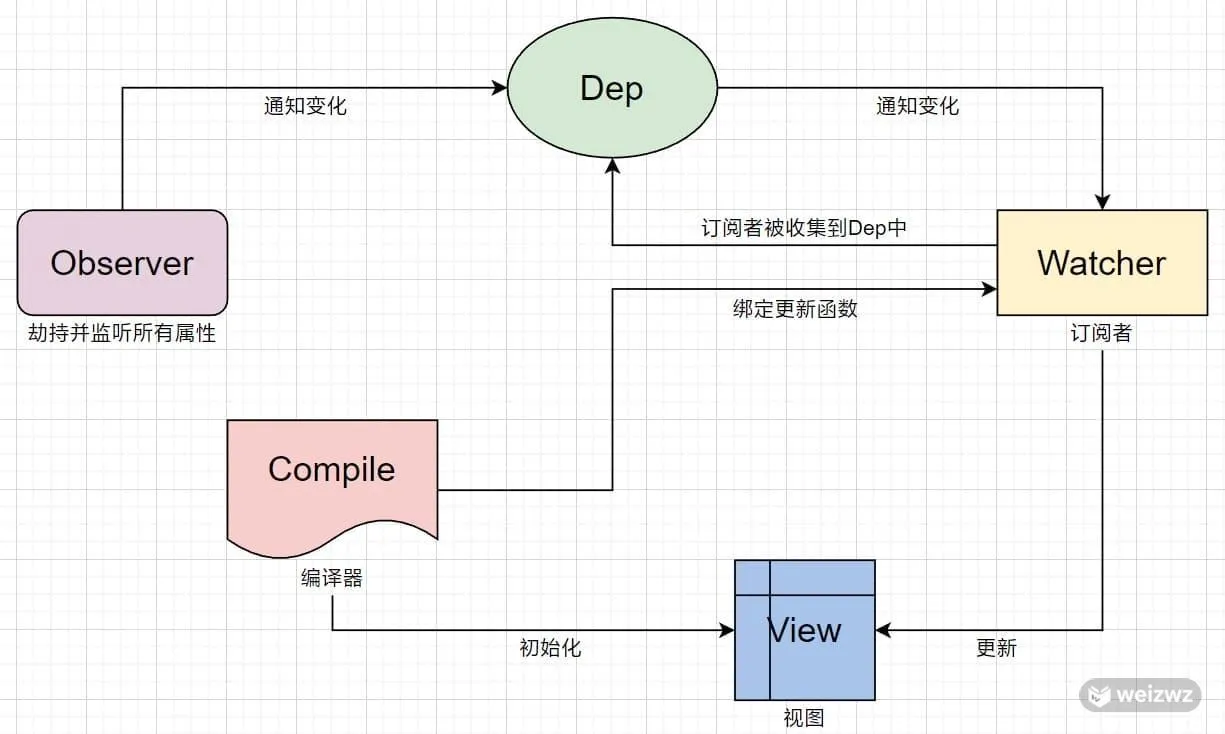
How Dep collects Watcher
When a Watcher reads a value, it temporarily assigns Dep.target to itself. Once the read is finished, Dep.target is reset to null. That makes it possible for the property’s get method to detect the current watcher and add it to that property’s internal dep.
// 通过获取操作, 触发属性里面的get方法
key.split('.').reduce((total, current) => total[current], vm._data)
// get 方法
get: function getter() {
  if (Dep.target) {
    // 在这里添加一个订阅者
    dep.addSub(Dep.target)
  }
  return val
}
How array interception is handled
Arrays cannot be observed directly with Object.defineProperty() in the same way as plain object properties, so the approach is different.
The usual strategy is to create an empty object that inherits from Array.prototype, then build an array method interceptor on top of it. In that interceptor, several array mutation methods are overridden—mainly these seven: push, pop, shift, unshift, splice, sort, and reverse.
When an array instance calls one of those methods, the intercepted version runs first so the array can be converted into reactive data.
The overall idea is still similar to object observation: the Observer is extended so it can collect dependencies from arrays and recursively observe nested elements. During traversal, if an array item is an object, it also enters object observation. Updates are then triggered through dependency notification, and newly inserted elements are also observed through the interceptor.
A minimal simulation of Vue’s two-way binding
The mechanism above becomes much easier to understand when matched with a small implementation. The following example only simulates the core behavior.
HTML
<!DOCTYPE html>
<html>
  <head>
    <meta charset="utf-8" />
    <title>vue双向绑定原理</title>
  </head>
  <body>
    <div id="app">
      <input type="text" v-model="value" />
      <div>{{value}}</div>
      <br />
      <input type="text" v-model="data.input" />
      <div>{{data.input}}</div>
    </div>
  </body>
  <script src="js/vue.index.js"></script>
  <script>
    const vm = new Vue({
      el: '#app',
      data() {
        return {
          value: '输入框1',
          data: {
            input: '输入框2'
          }
        }
      }
    })
  </script>
</html>
This template demonstrates both a top-level field and a nested field. The first input is bound to value, and the second is bound to data.input.
JavaScript
class Vue {
constructor(options) {
this.$options = options
const vm = this
if (this.$options.data) {
this.initData(vm)
}
if (this.$options.el) {
compile(this.$options.el, vm)
}
}
initData(vm) {
let data = vm.$options.data
data = typeof data === 'function' ? data.call(vm) : data
vm._data = data
observe(data)
for (let key in data) {
proxy(vm, key, data[key])
}
}
}
// 代理:实现 vm.name 可以直接访问 vm._data.name
function proxy(target, key, value) {
Object.defineProperty(target, key, {
get() {
return target['_data'][key]
},
set(newValue) {
target['_data'][key] = newValue
}
})
}
// 不是对象将被拦截
function observe(data) {
if (data === null || typeof data !== 'object') {
return
}
return new Observer(data)
}
// 监听器 这里只考虑对象了和对象嵌套, 没有考虑数组
class Observer {
constructor(data) {
this.walk(data)
}
walk(data) {
// 遍历对象的每一项, 进行监听和劫持
Object.keys(data).forEach((key) => defineReactive(data, key, data[key]))
}
}
// 通过defineProperty监听对象的属性并且给属性收集依赖
function defineReactive(target, key, value) {
// 递归监听属性值是对象的属性
observe(value)
// 添加Dep实例, 收集依赖
let dep = new Dep()
Object.defineProperty(target, key, {
get() {
Dep.target && dep.addSub(Dep.target)
return value
},
set(newValue) {
value = newValue
// 给新值添加监听
observe(newValue)
// 修改值的时候通知订阅者Watcher去更新
dep.notify()
}
})
}
// 收集器 - 依赖收集
class Dep {
constructor() {
// 里面装的是收集的watcher
this.subs = []
}
addSub(watcher) {
this.subs.push(watcher)
}
// 让收集到的所有watcher去更新
notify() {
this.subs.forEach((watcher) => watcher.update())
}
}
// 订阅者
class Watcher {
constructor(vm, key, callback) {
this.vm = vm
this.key = key
this.callback = callback
// 让 Dep.target 属性指向当前 watcher 实例
Dep.target = this
// reduce 逐个遍历数组元素, 每一步都将当前元素的值与上一步的计算结果相加
// 通过 reduce, 触发 defineReactive 的 get 方法, 从而让 Dep 收集到
key.split('.').reduce((total, current) => total[current], vm._data)
Dep.target = null
}
update() {
const value = this.key.split('.').reduce((total, current) => total[current], this.vm._data)
this.callback(value)
}
}
/** 解析模板
使用 documentFragment 创建模板, 注意 fragment.append 会让被插入的 child 节点从父节点中移除, while 循环结束后, 页面就没了
然后对模板里面的每一项进行解析:
先实例 node.nodeType === 3 的元素, 表示文本节点, 看文本节点里面有没有匹配到 {{name}} 模板表达式的,
如果有, 从 vm._data 里面去取对应的值, 替换文本的值, 最后 vm.$el.appendChild(fragment) 就可以将替换后的结果显示在页面上
对 nodeType === 1 的元素, 即标签解析, 这里我们假设处理的是 input,
获取节点的所有属性, 一个伪数组, 变成真数组, 里面有个 nodeName === v-model 和 nodeValue 对应 name 的,
同样获取 vm._data 里面 name 的值, 然后让节点的 node.value = 这个值, 就能显示在输入框里面了, 这就是数据改变视图。
接下来是视图改变数据, 添加 input 方法, 为 node 添加 addEventListener方法, input, 然后让 vm._data 里面对应属性的值等于 e.target.value, 这样就实现了视图改变数据。
重点: 上面的两种情况, nodeType == 3 的时候更新方法是 node.nodeValue = newValue, nodeType == 1 的时候更新方法是 node.value = newValue,
需要将这两个方法封装到 watcher 中, 在更新之后 new 一个 Watcher, 并将对应的参数传入, 后面在获取值的时候就会自动收集依赖, set 值的时候就会触发更新。
* @param {Object} el
* @param {Object} vm
*/
function compile(el, vm) {
vm.$el = el = document.querySelector(el)
const fragment = document.createDocumentFragment()
let child
while ((child = el.firstChild)) {
fragment.append(child)
}
fragment_compile(fragment)
function fragment_compile(node) {
const parttern = /\{\{\s*(\S+)\s*\}\}/
// 文本节点
if (node.nodeType === 3) {
// 匹配 {{}}, 第一项为匹配的内容, 第二项为匹配的变量名称
const match = parttern.exec(node.nodeValue)
if (match) {
const needChangeValue = node.nodeValue
// 获取到匹配的内容, 可能是 msg, 也可能是 mmm.msg,
// 注意通过 vm[mmm.msg] 是拿不到数据的, 要 vm[mmm][msg]
// 获取真实的值, 替换掉模板里面的 {{name}}, 真实的值从 vm.$options.data 里面取
let arr = match[1].split('.')
let value = arr.reduce((total, current) => total[current], vm._data)
// 将真实的值替换掉模板字符串, 这个就是更新模板的方法, 将这个方法封装到 watcher 里面
node.nodeValue = needChangeValue.replace(parttern, value)
const updateFn = (value) => {
node.nodeValue = needChangeValue.replace(parttern, value)
}
// 有个问题, node.nodeValue 在执行过一次之后, 值就变了, 不是 {{name}}, 而是真实值, 要将 {{name}} 里面的 name(即match[1]) 暂存起来
new Watcher(vm, match[1], updateFn)
}
return
}
// 元素节点
if (node.nodeType === 1 && node.nodeName === 'INPUT') {
// 伪数组
const attrs = node.attributes
let attr = Array.prototype.slice.call(attrs)
// 里面有个 nodeName === v-model, 有个 nodeValue 对应 name
attr.forEach((item) => {
if (item.nodeName === 'v-model') {
let value = getVmValue(item.nodeValue, vm)
// input 标签是修改 node.value
node.value = value
// 也需要添加 watcher
new Watcher(vm, item.nodeValue, (newValue) => (node.value = newValue))
// 添加 input 事件
node.addEventListener('input', (e) => {
const name = item.nodeValue
// 给 vm 上的属性赋值
// 不能直接 vm._data[name] = e.target.value , 因为 name 可能是 a.b 的形式
// 也不能直接获取 b 的值, 然后赋新值, 因为这个值是一个值类型, 需要先获取前面的引用类型
// 如: let tem = vm._data.a, 然后 tem[b] = 新值, 这样就可以达到 vm._data.a.b = 新值的效果
const arr1 = name.split('.')
const arr2 = arr1.slice(0, arr1.length - 1)
const head = arr2.reduce((total, current) => total[current], vm._data)
head[arr1[arr1.length - 1]] = e.target.value
})
}
})
}
node.childNodes.forEach((child) => fragment_compile(child))
}
vm.$el.appendChild(fragment)
}
function getVmValue(key, vm) {
return key.split('.').reduce((total, current) => total[current], vm._data)
}
function setVmValue(key, vm) {
let tem = key.split('.')
let fin = tem.reduce((total, current) => total[current], vm._data)
return fin
}
window.Vue = Vue
What this simplified implementation is doing
This example focuses on objects and nested objects, not arrays.
1. Proxying data onto the instance
During initialization, data is assigned to vm._data, then every top-level property is proxied onto vm. That makes vm.name behave like vm._data.name.
2. Observing objects recursively
The observe function checks whether a value is an object. If it is, it creates an Observer. The Observer walks through each key and turns it into a reactive property using defineReactive.
Inside defineReactive, there are two important actions:
- If the property value is itself an object, it is observed recursively.
- A new
Depinstance is created for that property so it can manage all watchers that depend on it.
The getter is responsible for dependency collection. If Dep.target currently points to a watcher, the getter adds that watcher into the property’s dep.
The setter handles updates. When a new value is assigned, it is observed again in case it is an object, and then dep.notify() is called so all related watchers can refresh.
3. How Watcher participates in dependency collection
A Watcher is created with three things:
- the current
vm - the key path, such as
valueordata.input - a callback used to update the UI
During construction, it assigns itself to Dep.target, then reads the value by splitting the key path and walking through vm._data with reduce. That read operation triggers the getter, which allows the property’s Dep to collect the watcher. Once the read finishes, Dep.target is cleared.
Later, when data changes and the property’s dep sends a notification, the watcher runs update(), reads the latest value again, and passes it to the callback.
4. Parsing the template with DocumentFragment
The compile function first finds the target element, then moves its child nodes into a DocumentFragment. One detail matters here: fragment.append(child) removes that child from its original parent, so after the loop the page container is temporarily emptied. That is expected.
The fragment is then parsed recursively.
Text nodes
When node.nodeType === 3, the node is a text node. The code checks whether it contains a template expression like {{name}}.
If a match exists:
- it extracts the expression inside the braces
- reads the real value from
vm._data - replaces the template text with the actual value
- creates a watcher whose callback updates
node.nodeValue
One subtle issue appears here: once node.nodeValue has been replaced, the original {{name}} expression is gone. That is why the matched key path, match[1], must be preserved separately and passed into Watcher.
Element nodes
When node.nodeType === 1 and node.nodeName === 'INPUT', the code treats it as an input using v-model.
It reads the element’s attributes, converts the attribute collection into a real array, and looks for the one whose nodeName is v-model. After finding it:
- it reads the bound value from
vm._data - assigns that value to
node.value - creates a watcher so later data changes will update the input
- adds an
inputevent listener so typing into the field writes the new value back into the data
That last step is the other half of two-way binding: the view updates the model.
For nested keys like a.b, the code cannot simply do vm._data[name] = e.target.value, because name is a string path rather than a direct property reference. It also cannot just grab b as a standalone primitive and assign to it. Instead, it first resolves the parent object reference, then writes the final segment onto that object. This is how vm._data.a.b = newValue is effectively achieved.
The essence of the flow
This simplified version shows the full cycle clearly:
Observerturns object properties into reactive getters and setters.Watcherreads data during initialization so dependencies can be collected.Depstores all watchers related to a property.Compileconnects template expressions and form inputs to the reactive system.- When data changes, watchers update the DOM.
- When input changes, event listeners write back to data.
That is the core of Vue-style two-way binding in a compact form.