A yearly chore that never quite fits
Every year there is another round of mandatory public training courses to complete. In practice, they are a lot like online classes, except not live ones—just on-demand videos waiting to be clicked through. To be fair, some of the course material is genuinely good. But for people working at the grassroots level, spending dozens of hours on classes that often have little to do with their actual jobs still feels like a burden.

In the first couple of years, people passed around a workaround built for Internet Explorer. With Enounce MySpeed, videos could be pushed up to 5x speed, which did make the whole thing more bearable. Later, though, the platform changed its rules: studying through IE or Safari no longer counted as valid.
This year, after dragging myself through 30 credits, I heard a colleague say he had someone else complete a class for him in the time it took to finish a single session. That was enough to send me down the rabbit hole over the weekend, looking for easier ways to deal with the platform.
What follows is just a record of the ideas I tested, not an encouragement to use them.
Method one: speeding up playback
The old IE route may be blocked, but H5 video itself can still be accelerated by other means. Tampermonkey scripts can do it, Chrome extensions can do it, and if necessary, you can even type playback-speed code directly into the browser console.
I borrowed a friend’s account to test things and ended up helping him complete his courses along the way. Working through 30 credits this way took me most of a day off and on. The main problem was that pushing the speed too high would trigger a platform warning:
“Top student, the system has detected abnormal learning behavior. Please continue your study as required, and may your learning be fruitful.”
That was the actual wording.
Once that pop-up appeared, the page would stop advancing unless you dealt with it. In practice, even clicking it usually did not help much—you had to reopen the lesson, and then you would discover that your progress had rolled back to much earlier. In other words, once accelerated playback was flagged, that stretch of learning often became invalid.

I tried to find a tolerable middle ground. Around 2.9x to 3.9x felt relatively stable, though not foolproof. At 16x, a warning would appear almost immediately unless the lesson itself was under ten minutes.
The basic conclusion: this approach works, but the abnormal-behavior prompts show up intermittently and unpredictably, so it is not very reliable.
Method two: altering the player through JavaScript
While browsing around, I came across a route I had not considered before: hijacking JavaScript and changing the player configuration directly. The example I found targeted CKplayer, and that seemed approachable because its official documentation and even the comments inside the JavaScript were pretty clear. In theory, you could modify the config and then use a Chrome extension to replace the original file.
The platform I was dealing with, however, used Aliplayer. I went through the documentation twice and still could not find any setting related to disabling seeking for on-demand video. I even contacted customer support. They responded with a live-streaming setting—isLive—where dragging the progress bar is disabled when it is true. When I pressed for more, I basically got told to test it locally myself. So that route was not going to produce an easy answer.
I saved the platform’s self-hosted JavaScript file, edited a few places, and then used the GoRes extension to swap in my modified version. The console showed that the replacement redirect had succeeded, but none of my changes took effect. Neither playback speed nor the initial playback position changed. The player behaved exactly as before.

So yes, this method seems theoretically possible if the player restrictions are indeed enforced through JavaScript. But I did not feel like spending even more time untangling that mess, especially after I found a third option.
Method three: intercepting and modifying requests
On Bilibili, someone had posted a video showing how to use Firefox to modify a POST request called writeRecordWhileClose. The idea was simple: change the progress value in the request headers to match the full video length, and the course could be completed almost instantly.
Unfortunately, when I tested it in Firefox, that request would show up as a few hundred bytes in size, but the console would not display the headers.

That reminded me of another oddity: every refresh in Firefox produced Error: Request aborted, while Chrome did not. So I changed the browser UA to Chrome’s UA. The error disappeared, but the headers for that request still would not show up in the console.
So it was time for Fiddler.
With Fiddler running, the request headers became visible.
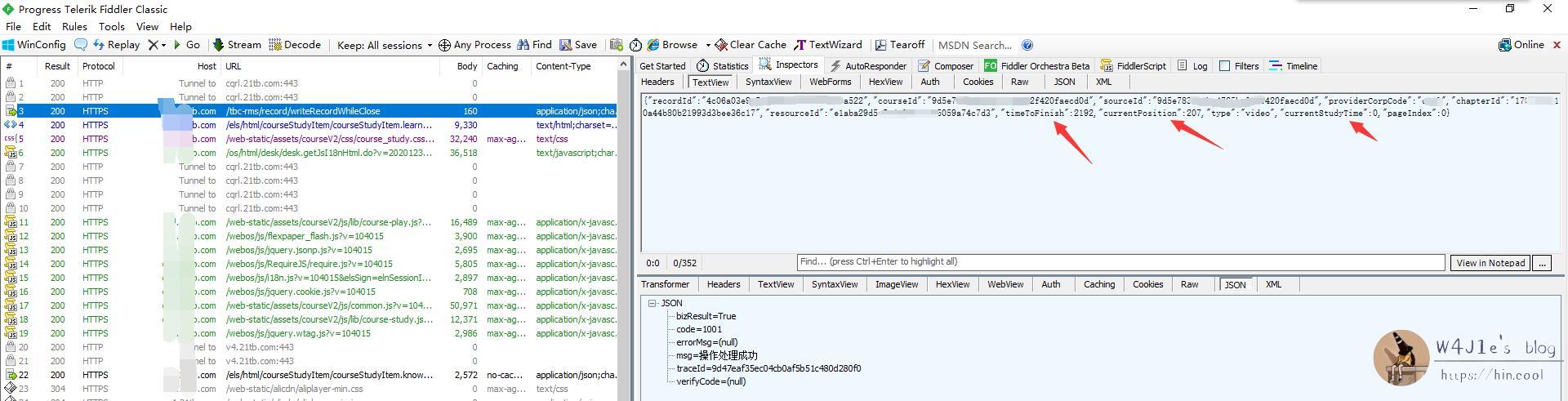
At that point, the obvious next step was to edit the request and resend it. That failed. My guess was that the server side had some additional validation.

I kept digging through the captured traffic and found another request: updateCourseRecord. Once opened, it looked very similar to writeRecordWhileClose, and from the name alone it also appeared to be responsible for uploading study progress. I modified it, resent it, and it worked—but only once.
Later I noticed that this request does not appear consistently. It only shows up occasionally, usually after finishing a subsection or switching between sections. If it would not appear on its own, then the next idea was to build the request manually. Using getStudyRecordList, I could obtain data such as recordId, cookies, courseId, and chapterId, then fill those values into a request I constructed myself and send it.
That failed too.
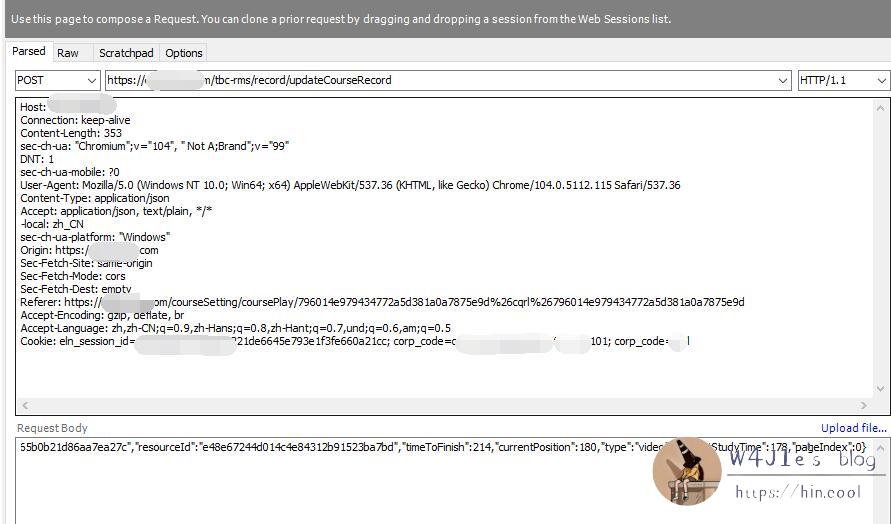
In the end, what I found was this: both writeRecordWhileClose and updateCourseRecord can submit progress reliably, and the former does not even require extra effort to gather header values. The catch is that if the increment in a single submission exceeds roughly 400, the platform flags it as abnormal.
What all this amounted to
Of the three approaches, the first one—speeding up playback—was the most time-consuming, but also the simplest. If someone is sitting there to watch for pop-up warnings and restart lessons when needed, then finishing 30 credits in half a day is realistic.
The second approach, modifying JavaScript, still seems possible in principle if the platform really enforces restrictions such as no fast-forwarding or playback speed limits at the player-script level. But those features are not plainly documented in comments, and the saved JavaScript file was huge and messy enough that it would take much more time to reverse-engineer.
The third route, intercepting and editing requests, is also workable. The practical version would be to write a script that repeatedly increases the progress recorded in writeRecordWhileClose, but only by modest amounts each time, gradually adding study time without tripping the abnormal-behavior check.
Really, this whole exercise was just a record of how I spent a weekend tinkering with something I wish I did not have to tinker with at all. Ideally, one day either these courses stop being a compulsory ritual, or the material finally becomes useful enough that working through it no longer feels like dead weight.